by Brad Strong | Sep 22, 2020 | Blog, CAD Repair, What's New |
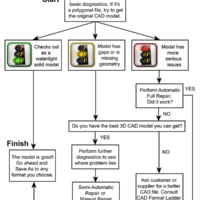
3D model repair can cost companies an immense amount of time. Considering the costs to engineer and designer productivity, as well as the potential delays to critical projects, it is critical not to spend any more time or resources on repair than necessaary. As indicated in the flowchart at right, the major steps would include: Start with the best, original CAD model when possible. Run basic diagnostics to determine if the file is good, and to discern what and where the problems might be. Your diagnostic software will usually break results into two or three categories; good, missing geometry, and corrupt geometry. At this point, you may want to run any...
by Brad Strong | Aug 26, 2020 | 3D Printing, Blog, CAD Repair, What's New |
While there are various ways to perform STL repair, it’s best to avoid it in the first place if you can. If you are starting with a CAD file, that’s where the diagnostic and repair process should start, before intelligent geometry is degraded into non-intelligent STL triangles. The further you get from the source information, the further you get from the original design. Just look at the data for yourself; CAD geometry is defined by cylinders, planes, arcs and lines, and can be measured precisely. STL geometry is just a congolmeration of triangles approximating the original CAD geometry. So by first making sure the CAD model is a quality watertight solid, you...
by Brad Strong | Aug 24, 2020 | Blog, CAD Diagnostics, CAD Performance, CAD Repair, CAD Translation, CAD Viewing, Training, What's New |
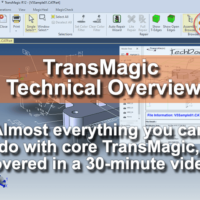
vThis article and video attempts to cover the majority of functionality you get with core TransMagic products, without going too long. In a 30-minute video, you can see a quick overview of what is possible with core TransMagic in one sitting, without having to go to multiple pages or videos. Many of our customers use TransMagic only for translation and basic repair, but you may have more in your tool box than you suspected. This video gives you a glimpse of what is already in your toolbox. Please note Tech Docs is covered in this video and is available only in TransMagic EXPERT. Other differences between core versions and functionality not covered in this...

by Brad Strong | Apr 6, 2020 | 3D Printing, Blog, CAD Comparison, CAD Diagnostics, CAD Repair, CAD Translation, CAD Validation, CAD Viewing, Polygonal Output, What's New |
By popular demand, this offer is extended to run until June 30, 2020. To help small businesses to be more productive during the COVID-19 crisis, TransMagic will be supplying 500 90-day complimentary licenses of our CAD viewing, healing and model validation software on a first come basis. This software will open all major 3D CAD formats and will be ideal for estimating/quoting, creating technical data packages, and compliance with Boeing D6-5991 specifications. These licenses will run 90 days. The exact configuration will be SUPERVIEW plus MagicHeal, for repairing geometry and creating water-tight solids, and MagicCheck, for high accuracy comparison between two...
by Brad Strong | Mar 9, 2020 | Blog, CAD Comparison, CAD Diagnostics, CAD Performance, CAD Repair, CAD Systems, CAD Translation, CAD Validation, CAD Viewing, What's New |
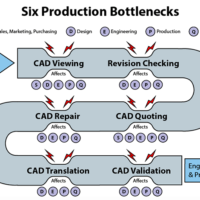
Normally, we think of production bottlenecks as occurring on the production floor; but there are upstream processes which can delay production as well as adversely impact manufacturing, quality assurance and scrap. CAD Viewing The inability for all project stakeholders to view and interact with CAD model data can become a production bottleneck, because 3D part and assembly models give the entire team a window into the project which could trigger necessary interventions early in the production process, before they become prohibitively expensive. CAD Viewers and 3D PDFs – This doesn’t mean all stakeholders need a full CAD seat, however; they might just...
by Brad Strong | Jul 29, 2019 | Blog, CAD Comparison, CAD Repair, CAD Translation, CAD Validation, CAD Viewing, What's New |
The purpose of How to Destroy a Spacecraft in 7 Easy Steps is to emphasize how easy it is to inadvertently make bad design and manufacturing decisions which can not only affect astronauts in the space program, but can extend to all sectors and endanger lives, products and companies. We honor the men and women who’ve given their lives to advance our space program. Many of us know the story of how the Apollo 13 spacecraft blew her oxygen tanks near the moon, nearly costing the lives of three astronauts, but through heroic acts and ingenuity, managed to limp home with all her crew intact. The incident nearly derailed the Apollo space program – but few of us know...